NORSBIT APP · ENGLISH, WORD BY WORD
Start with
a word.
Build up to
sentences.
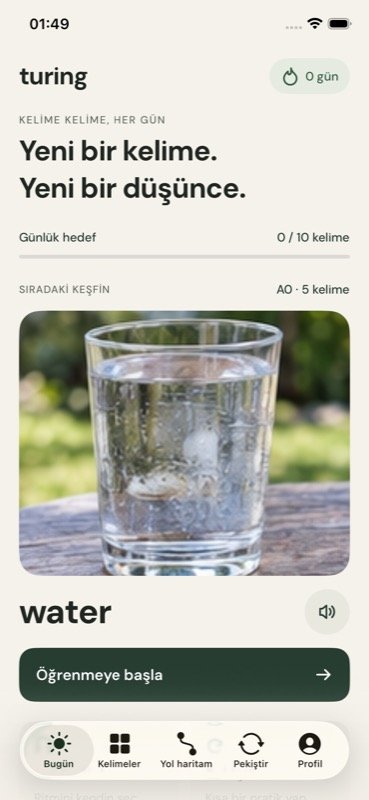
Discover a word through a photo. Recall it without looking. Use it in your own sentence. Turing is a focused space for bringing English vocabulary into everyday life, with Turkish meanings.
Available free on the App Store for iPhone.
I drink water every day.
Turkish: Her gün su içerim.FROM RECOGNITION TO USE
Recognising a word
is the first step.
The practice begins when you hide the answer. Turing brings words back in different ways, helping you work with them beyond the next screen.
Then recall it again. Return to your words when a review is due. Finding an answer with a hint and recalling it independently are tracked separately.
Discover a word through a photo, then recall its meaning.
TODAY’S NEW WORD, YOUR NEXT SENTENCE
Use the words
you learned today
in a sentence today.
After your daily word round, fill in gaps, write sentences or arrange word tiles using those same words. Use what you have learned before moving to a new list.
Example daily goal: 10 words → a short sentence round with the same words.
FROM WORD TO SENTENCE · EXAMPLE
Turkish: Her gün su içerim.
LISTEN ON THE GO
Eyes off the screen.
Keep listening, keep learning.
Review your words while walking or travelling. Hear the English word, pause to think, then hear its Turkish meaning. Adjust the speed and repetitions to suit you.
··· Pause for 2 seconds ···
··· pause again, then continue ···
240 sentences, both ways.
Write or arrange word tiles. Practise basic sentence patterns with 480 translation attempts between Turkish and English.
Let mistakes guide you.
Return to words you misspelled. Learn from feedback based on prepared answers and accepted alternatives.
See your own progress.
Track your daily goal, studied words and reviews. Pick up where you left off with the next small step.
YOUR QUESTIONS
Before you begin.
Can I download Turing now?
Which levels does it cover?
The app contains 4,000 words organised into A0, A1, A2, B1 and B2. These categories guide the learning journey; they are not an official placement test or qualification.
Do I need an internet connection or account?
In the current version, core vocabulary exercises, content and prepared sentence checking work offline. Core learning does not require an account. Optional Apple account and iCloud features require an internet connection.
Can it check any sentence I write?
Sentence exercises compare your answer with prepared examples and accepted alternatives. This version does not include an online AI service that can evaluate every freely written sentence.
How does review work?
It combines recalling an answer without looking with reviewing at different times. Correct, incorrect and assisted attempts are tracked separately. Learning takes regular practice; a single correct answer does not guarantee long-term retention.
Which devices is it being developed for?
Turing is being developed for iOS 17 and later. This page introduces the app; it is not a browser version of Turing.
AVAILABLE ON THE APP STORE
Your next word,
in your pocket now.
Download Turing free from the App Store and start learning today.
Download on the App Store ↗Explore EGA Studio